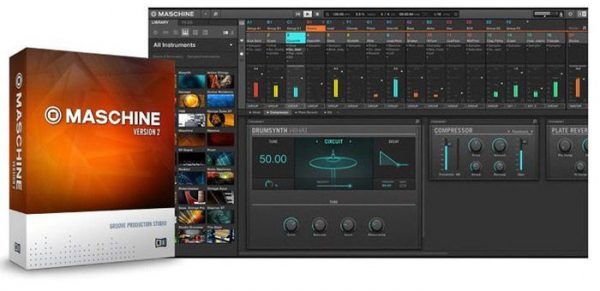
![[节奏工作站]Native Instruments Maschine 2 v2.14.3 [WiN, MacOS](1.66GB)插图](https://www.midivst.com/wp-content/uploads/2022/05/maschine-2-0-software-update-1.jpg "[节奏工作站]Native Instruments Maschine 2 v2.14.3 [WiN, MacOS](1.66GB)插图")
WiN: Team R2R | 292.78 MB | MAC: P2P | 629.18 MB
强大的创作软件
MASCHINE 软件拥有让你的灵感变成成品音乐的所有要素。 无论你是在制作音乐随笔、编曲,或是混音和现场演出,MASCHINE 都能让你更进一步——而不会打乱你的创造的步伐。
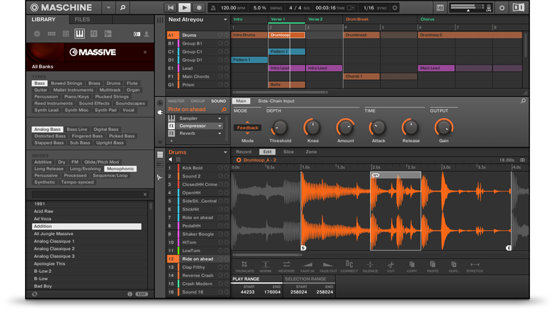
MASCHINE 的 采样器 让你可以像外科医生一样精准地切割声音。 在四种模式中找到最适合你的方法: Detect(侦测),Grid(栅格),Split(分离),Manual(手动) 将切片自动分配至打击垫上,像鼓机般任意演奏。
灵感视图(Ideas view) 你可以很容易地收集灵感、创意,或者计划安排一场演出内容。 录下交替的贝斯旋律线。 为不同的鼓点加花(drum fill)、breakdown、以及其他的鼓点创建场景(scene)。
把这些场景组合起来,然后进行尝试,直到你找到你自己喜欢的。管理界面基于片段的样式音序器让你的灵感快速地实现。 可以编辑样式(Pattern)、微调音符(nudge note)、改变力度,录制调制,此外还有更多。
MASCHINE 超快速、 基于标签的浏览器 根据声音特性来分类乐器和声音变得非常简单,让你的灵感创作完全停不下来。
MASCHINE 强大的混音器 让你可以观察并可以只用一个旋钮来调整群组和声音通道的电平——只需简单地选择需要调节的通道,然后通过屏幕下方的旋钮来进行调整。你可以使用自己的 VST 或 Audio Units 插件,还可以演奏 MASSIVE、MONARK、REAKTOR,或其他包含音色和效果器的软件。
Maschine 2 is a next-generation of powerful beat-production workstation with sampling, loop slicing, built‑in drum sequencing, improved browsing, arranging, new mixer, plug-in strip, and exclusive drum synths. With Maschine 2 you will get the most responsive, fluid, and musical beatmaking experience ever.
Maschine 2 is built on an intelligent combination of timeless groove box and drum machine workflows, systematically refined and expanded to take advantage of the best aspects of computer technology. It brings together flexible step sequencing and real-time polyphonic recording in a forward-thinking pattern-based arrangement concept that makes it easy to jam out ideas, and turn them into full-blown songs in a way that is efficient, effortless and fun.
The system combines an advanced software sequencer and sampler with a seamlessly integrated, highly functional performance controller. Finally merging a fast and intuitive groove-box workflow with the power and versatility of software, Maschine enables an inspiring and spontaneous creative approach for today’s computer-based music production setups.
The advanced Maschine controller was designed as a natural extension of the software, and makes the system feel and respond as a true instrument. The 16 pressure-sensitive drum pads have been carefully engineered for the best possible response and durability, and they illuminate to visualize sequence patterns and other crucial information. Eight rotary encoders, a concise layout of dedicated buttons and dual high-resolution displays give immediate access to all functions of Maschine without touching the computer mouse or keyboard. With new MIDI CC capabilities, you can control your MIDI-capable external instruments, like your favorite Roland groovebox or Korg synth, as if they were plugins.
The new Variation Engine helps add variety and spontaneity to your patterns. Humanize lets you shake off the shackles of quantization and loosen up a drum beat or melody.
Based on a powerful high-resolution sample engine, Maschine 2 is a versatile instrument that renders intricate drum kits and percussion, loops and multi-sampled polyphonic instruments with uncompromising sonic accuracy, assisted by beat slicing, automatic sample mapping, note repeat and more. On ttded.com you can find and download a lot of professional Expansions for Maschine 2.
You can download Maschine 2 Factory Library HERE
v2.14.2
FIXED Crash when expanding dropdown in Export Audio dialogue box
-FIXED Crash when automating Effect parameters
-FIXED Arp parameters ‘Offset’ and ‘Range’ (introduced in MASCHINE 2.14) have incorrect default values when opening projects created in older versions of MASCHINE
-FIXED pal.db file is created in system folder instead of user folder on macOS
-FIXED Quick Browse does not work after loading Drum Synth, Bass Synth, or Poly Synth from Slot menu
-IMPROVED ‘Drumsynth’ renamed to ‘Drum Synth’
v2.14
After installing from Native Access, please ensure that any external storage devices containing content are connected when launching MASCHINE for the first time
ADDED Poly Synth – based on Pro 53
Factory Library also updated to add presets
ADDED Multi-selection of Clips in software
ADDED Change scenes via MIDI from MASCHINE MK3 (configure via SETTINGS > MIDI Tab)
ADDED Host Kontakt VST3 (please note: it is not currently possible to host VST3 versions of the recently released FX plug-ins)
ADDED Apple Silicon support:
MASCHINE (standalone application) can be used on Apple Silicon machines when Rosetta 2 is installed (available from App Store)
MASCHINE plug-in can be used in DAWs that have been launched using Rosetta (right-click on DAW application in Finder > Get Info > Open using Rosetta)
ADDED Additional Arpeggiator parameters: Retrigger, Repeat, Offset, Inversion and Range (available from MASCHINE MK3, MK2, Studio and KOMPLETE KONTROL S-Series MK2 controllers)
ADDED Save presets from MASCHINE MK3
CHANGED File paths in preferences are now shown in the standard POSIX format instead of the old Mac HFS format (i.e. slashes instead of colons) on macOS
CHANGED Browser tag ‘Urban’ has been changed to ‘Hip Hop’ for MASCHINE Projects and Groups
CHANGED ‘Enabled’ / ‘Disabled’ have been changed to ‘On’ / ‘Off’
FIXED Audio crackles when sampling (introduced in MASCHINE 2.13)
FIXED Clunky scrolling when using a MacBook trackpad
FIXED Super 8 missing background image on controllers
Release Note:(v2.14.2 Fixed2)
v2 AAX fixed