![[AI音频分离软件] Hit’n’Mix RipX DAW PRO v8.0.3 [MacOS](1.48GB)插图](https://www.midivst.com/wp-content/uploads/2026/01/ripx-daw.jpg "[AI音频分离软件] Hit’n’Mix RipX DAW PRO v8.0.3 [MacOS](1.48GB)插图")
Hit'n'Mix RipX DAW PRO 是一款基于人工智能的音频编辑软件,专注于音轨分离、音频修复和创意编辑,适用于音乐制作、混音、采样和声音设计等场景。
核心功能包括: - AI驱动的音轨分离:可将音频源(如歌曲)分解为人声、鼓、贝斯、吉他、钢琴等独立音轨,分离后每个音轨可像MIDI一样进行编辑。 - 谐波编辑:允许用户直接调整音频的泛音结构,实现音高、和弦、节奏和音色的精细修改,甚至重新配器。 - 专业音频修复:提供去噪、去啸叫、去齿音、修复破音或剪切等功能,适用于旧录音、现场音频或播客清理。 - 创意工具:内置Track Starter(自动生成Loop)、RipLoops(动态循环片段)、和弦工具及11种新效果器(如RipTone、RipVibe),支持自动化工作流程。
最新版本(8.0.0,2025年11月发布)新增了多项功能: - 改进的用户界面,包括Layers面板的行视图选项和弹出工具栏扩展。 - 新增自动化锚点功能,支持双击编辑自动化轨道。 - 增强的移动创作支持(iPhone/iPad),以及REACT FX功能,允许通过设备倾斜控制效果。 - Windows版本新增Nvidia显卡的CUDA加速,提升分离和导出速度。
原文:
RipX DAW PRO adds the award-winning Audioshop tools and Harmonic Editor for the most precise audio editing available to create an AI DAW with unlimited capabilities. Two further panels are also included: Repair for quickly cleaning up audio non-destructively; and RipScripts for writing custom tools.
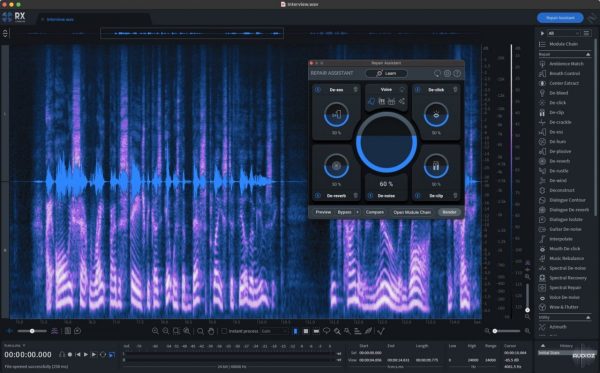
RipX DAW PRO comes with all of the features of the RipX AI DAW, and then adds advanced stem clean-up and audio manipulation tools to the workflow so you can create the highest quality extracted audio, and tweak / create sound at unprecedented levels of detail. Think of it like a built-in Izotope RX suite.
RipX DAW PRO adds the following features and much more:
✓ Award-winning Audioshop® tools for fixing and cleaning up recordings quickly and easily
✓ Unpitched audio editor for cleaning up noise separately from pitched sounds
✓ The powerful and unique Harmonic Editor for the ultimate in sound editing
✓ RipScript scripting language for building and customizing your own tools
Experience unprecedented control over notes, harmonics and unpitched sound, all in a powerful and easy-to-use click & drag interface.
Audioshop® Sound Manipulation Tools:
✓ Powerfully & quickly adjust pitch, time-stretch, copy and paste individual or groups of notes, sibilants and unpitched sounds.
✓ Edit Unpitched tool displays all unpitched sound spread over the entire Rip, from its top to its bottom. Click & drag to select a region of unpitched sound and edit it.
✓ Draw notes, drums and samples onto your rip with the Draw Sound tool.
✓ Use the Split tool to cut notes into sections for further editing.
✓ Piece together notes so you can edit as one, with the Join tool.
✓ Clone characteristics such as pitch variation (e.g. vibrato), sound (timbre with volume) & panning from one note to another, for example to duplicate a real instrumentalist’s playing style, with the Clone tool.
✓ Make fine pitch adjustments and slides simply by clicking and dragging, with the Draw Pitch tool.
✓ Add fluctuations in pitch, formant, volume, and panning to notes, using the Apply Pattern tool.
✓ Blend together the pitch, formant, timbre, volume and/or stereo panning of notes by clicking & dragging over them, with the Smooth Region tool.
Harmonic Editor
This is no basic spectrum editor – these are the actual harmonics that describe the sound of a note, and Harmonic Editor allows complete control over them.
Perfect for removing noise, adjusting timbre and creating interesting new sounds.
Clean & Repair Audio
Live audio repair and clean-up features for removing background noise, limiting foreground artifacts, reducing tones & hum, and purifying pitched and unpitched sounds.
Adjust overtone levels in notes and even regenerate fundamental harmonics, to bring back bass presence in vocals and instruments, lost during mixing & mastering.
Supported Operation System:
- macOS 10.12 or later
- Apple Silicon or Intel Core processor
Team HCiSO